The Critical Path, Explained Simply
Some tasks in a project can run late and nobody notices. Others push the finish date back the moment they slip. This page shows you how to tell them apart, how to work it out by hand, and what to do with the answer.
01 What the critical path means
The critical path is the longest run of linked tasks through a project, from its first task to its last. Its length is the shortest time the whole project can take. None of the tasks on it have any spare time, so if one of them takes a day longer, the project finishes a day later.
Every other task in the plan has some slack around it. It can start a little late, or take a little longer, and the finish date doesn’t move. That slack is called float. The critical path is simply the set of tasks with no float at all.
Two things follow from that, and they’re the reason project managers care about it. If you want to know which delays will cost you, look at the critical path. And if you want to finish sooner, the critical path is the only place where saving time makes any difference.
02 An example you already know: planning a party
It’s Monday and you’re having people round on Saturday. There are four jobs.
- Send the invitations. Monday.
- Give people time to reply. Tuesday to Thursday.
- Buy the food once you know how many are coming. Friday.
- Order a cake. The bakery needs three days.
The first three can’t overlap. You can’t shop until you have the replies, and you can’t get replies before you’ve invited anyone. That chain takes all five days, Monday to Friday, which makes it the critical path. If the replies come in a day late, the shopping slides into Saturday morning and the party starts late.
The cake is different. It only needs three days, and nothing else is waiting for it. You could order it on Monday, Tuesday or Wednesday and it would still be ready on Friday. Those two spare days are its float.
The red chain fills the week, so it decides when the party can happen. The cake has two days to spare.
Notice that the cake might be the thing you care about most. It doesn’t matter. Being critical has nothing to do with importance. It only depends on whether anything is left waiting when the task runs late.
03 Float, and the two kinds of it
Float is the number of days a task can slip before it causes a problem. Some tools call it slack. Same thing.
There are two kinds, because there are two different problems a late task can cause.
Total float
How far the task can slip before the project’s finish date moves. When people say “float” without saying which, this is the one they mean. Zero total float means the task is critical.
Free float
How far the task can slip before the very next task has to start later. It’s never more than the total float, and it’s often less.
The difference shows up when two tasks with float sit one after the other. Say an electrician has a one-day job, and right after it someone has to test the new circuits, also one day. Both tasks together have one spare day before they hold up the plasterer. If the electrician runs a day late, the testing starts a day late too, but the plasterer still starts on time. So the electrician’s job has one day of total float and no free float. The spare day belongs to the pair, and using it up early leaves none for the task after.
That’s worth knowing on a real job. Float shared along a chain gets spent by whoever slips first.
04 Working it out by hand: the bathroom at Oakfield Villa
Here’s a slightly bigger plan, the main bathroom in the Oakfield Villa build that runs through the Gantt Excel documentation. Seven tasks, counted in working days. The tiles are being made to order, so the supplier needs six days from the day you order them.
Finding the critical path by hand is the critical path method, or CPM. It’s two passes through the plan and a subtraction.
- Forward pass. Start at day 1 and go down the list. Each task starts the day after the last thing it waits for has finished. That gives every task its earliest start and finish, and the last finish is the project’s finish date.
- Backward pass. Start from that finish date and work back up the list. Each task has to finish the day before the earliest of the tasks waiting for it needs to start. That gives every task its latest start and finish.
- Subtract. Latest start minus earliest start is the task’s total float. The tasks with zero are the critical path.
| Task | Days | Waits for | Earliest | Latest | Float |
|---|---|---|---|---|---|
| 1. Strip out the old bathroom | 2 | Nothing | Days 1 to 2 | Days 1 to 2 | 0 |
| 2. Plumbing first fix | 3 | 1 | Days 3 to 5 | Days 3 to 5 | 0 |
| 3. Electrics first fix | 1 | 1 | Day 3 | Day 4 | 1 |
| 4. Test the new circuits | 1 | 3 | Day 4 | Day 5 | 1 |
| 5. Tiles made and delivered | 6 | Nothing | Days 1 to 6 | Days 2 to 7 | 1 |
| 6. Plaster the walls | 2 | 2 and 4 | Days 6 to 7 | Days 6 to 7 | 0 |
| 7. Tile the walls and floor | 3 | 5 and 6 | Days 8 to 10 | Days 8 to 10 | 0 |
The four shaded rows have no float. Strip out, plumbing, plastering and tiling are the critical path, and they add up to the ten days the bathroom takes.
A few of those numbers are worth walking through, because this is where people usually go wrong.
Plastering waits for two things: the plumbing, which finishes on day 5, and the circuit test, which finishes on day 4. The later of the two wins, so plastering starts on day 6. Tiling is the same. The plaster is done on day 7 and the tiles arrive on day 6, so tiling starts on day 8.
Going backwards, stripping out feeds both the plumbing and the electrics. The plumbing has to start by day 3 and the electrics by day 4. Stripping out has to be finished in time for the earlier of those, day 2, so it has no float even though the electrics could wait.
The electrics and the circuit test are the pair from section 03. They have one day of float between them, and the electrics have no free float of their own.
05 When a task runs over its float
The tile supplier rings on day 3. The tiles will be two days late, arriving at the end of day 8 instead of day 6.
The tiles had one day of float. One of the two days is absorbed by that float and costs nothing. The other one comes straight off the end of the project. Tiling now runs from day 9 to day 11, and the bathroom is finished a day late.
The rule. A late task only delays the project by however much it runs over its float. Two days late with one day of float is one day lost. Two days late with five days of float is nothing lost.
Something else changed too. The tile delivery is now on the critical path, because it’s the thing holding up the tiling. And the chain that was critical a minute ago, stripping out, plumbing and plastering, now has a day of float, because the tiler can’t start on day 8 any more whether the plaster is dry or not.
So the critical path isn’t fixed. It moves every time a task finishes early or late, which is why it’s worth checking every week of a project rather than working it out once at the start and filing it.
06 Bringing the finish date forward
When a client asks whether the job can be done sooner, the critical path shows you which tasks are worth the effort. Saving time on a task with float changes nothing. In the bathroom, getting the electrician to finish in half a day just gives the test more float. The bathroom still takes ten days.
There are two standard ways to shorten the critical path itself.
- Crashing
- Put more people or more hours on a critical task so it takes less time. A second plumber might get the first fix done in two days instead of three. It usually costs money, so pick the critical task where a day is cheapest to buy.
- Fast-tracking
- Let two critical tasks overlap that were planned one after the other. The plasterer could start the wall that has no pipes in it while the plumber finishes the other one. It saves time but adds risk, because the second task now starts before the first is completely done.
Either way, check the plan again afterwards. Take a day off the plumbing and the bathroom finishes on day 9. Take a second day off and it still finishes on day 9, because the electrics chain and the tile delivery take nine days as well. After that first day the plan has three critical paths of the same length, and you’d have to shorten all three, or the tiling itself, to gain any more.
That’s the part people miss when they do this in their head. Shorten the longest chain enough and a different chain becomes the longest.
07 The critical path in Excel
A seven-task bathroom is fine on paper. A house with eighty tasks isn’t, and it has to be redone every time something moves. Ordinary Excel formulas can’t do it either, because each task’s latest date depends on the tasks after it, and those depend on the ones after them. Our page on task dependencies in an Excel Gantt chart explains why that turns into a circular reference if you try.
Gantt Excel has the two passes built in. Once your tasks are linked, it works out the critical path and the float of every task, and it does it again every time you change a date, a duration or a link.

To see it on your own chart:
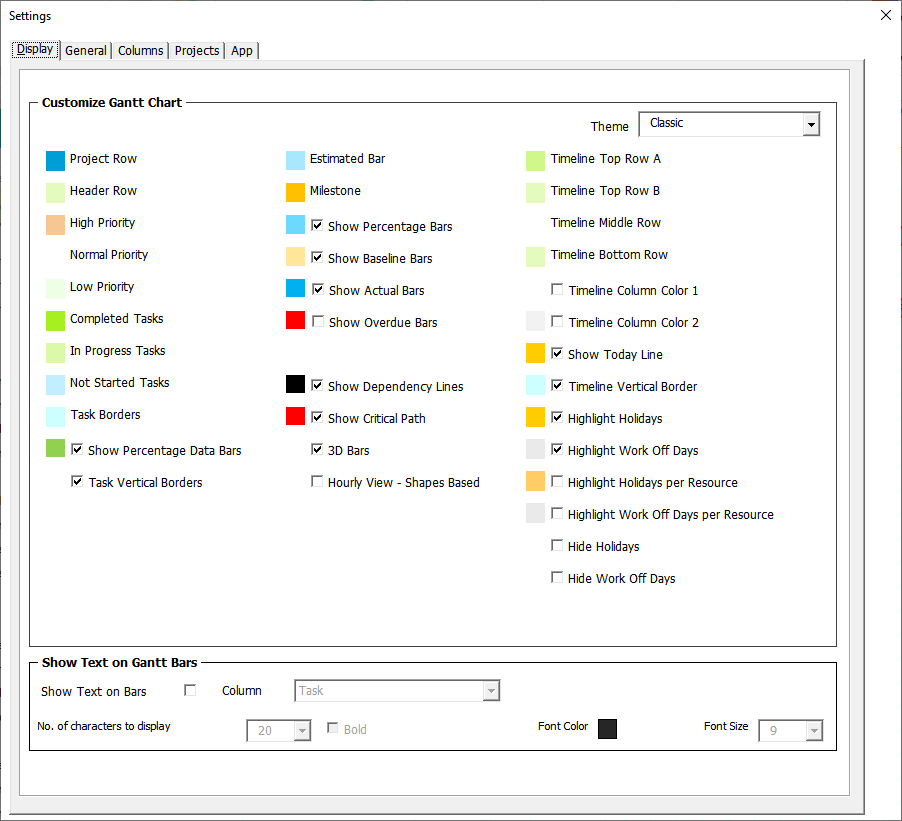
- On the Gantt Excel tab, open Settings.
- On the Display tab, tick Show Critical Path. The colour box beside it changes the red to something else if you’d rather.
- Close Settings. Critical tasks get a red outline, and the arrows between two critical tasks turn red.
Five columns sit beside your tasks with the numbers from section 04: Late Start, Late Finish, Total Float, Free Slack and Critical. They’re worked out whether or not the red is switched on, so you can sort or filter by float at any time. Float is counted in each task’s own working days, so weekends, holidays and a person’s days off are left out the way they are for the bars. On an hourly chart it’s counted in working hours.
The step-by-step guide covers the rest, including summary rows, hourly charts and people who work different days: The critical path and float in Gantt Excel.
08 The words, in one line each
- Critical path
- The longest run of linked tasks through the plan. Its tasks have no float.
- Critical task
- A task on the critical path. If it runs late, the project runs late.
- Float, or slack
- How long a task can slip before something else has to move.
- Total float
- How long a task can slip before the finish date moves.
- Free float, or free slack
- How long a task can slip before the next task has to start later.
- Earliest start and finish
- The soonest a task can happen, found by the forward pass.
- Late start and late finish
- The latest a task can happen without delaying the project, found by the backward pass.
- Critical path method (CPM)
- The forward pass, backward pass and subtraction that find all of the above.
- Crashing
- Adding people or hours to a critical task to shorten it.
- Fast-tracking
- Overlapping critical tasks that were planned to run one after the other.
09 Questions people ask
Can a project have two critical paths?
Yes. When two chains are exactly the same length, both are critical, so a late task on either of them makes the whole project late. It’s common after you’ve shortened a plan, as the bathroom example shows.
Is the critical path the longest or the shortest path?
The longest chain of tasks. The confusion comes from the fact that its length is the shortest time the whole project can take. You can’t finish any sooner than the longest chain allows.
Does a milestone count?
Yes. A milestone takes no time, but it sits in the chain like any other task, so it can be critical. In Gantt Excel a critical milestone’s diamond gets the same red outline as a critical task.
Can float be negative?
In some tools, yes. They show negative float when a task already has to finish later than a fixed deadline allows. Gantt Excel works out float against the finish date of the plan itself, so the lowest it ever shows is zero.
What’s the difference between the critical path and CPM?
The critical path is the answer. CPM, the critical path method, is the way you find it: the forward pass, the backward pass, and the float that falls out of the two.
Do weekends count as float?
Not in a plan that counts working days. If a task finishes on Friday and the next one starts on Monday, the weekend in between isn’t float, because nobody was going to work on it. Gantt Excel counts float in each task’s own working days, so holidays and a person’s days off are left out too.
Can I find the critical path in Excel without a template?
For a handful of tasks you can work it out on paper, as in section 04, and type the answers in. Keeping it current in a plain spreadsheet is the hard part, because every change means doing both passes again by hand. A template with the scheduling built in does that for you each time something moves.
Is a critical task the same as a high-priority task?
No. Priority is a judgement about how much a task matters. Critical is a fact about timing that comes from the links. A small, dull task can be critical just because everything after it is waiting for it.
10 Read next
- The critical path and float in Gantt ExcelThe guide: switching it on, the five columns, hourly charts and mixed working calendars.
- Task dependencies in an Excel Gantt chartThe four kinds of link, lag and lead, which are what the critical path is built from.
- Running a project in Excel week by weekWhere checking the critical path fits in a weekly update.
Try it on a plan of your own
Gantt Excel works out the critical path and the float of every task, inside Microsoft Excel, and keeps both up to date as the plan changes.
Runs in Microsoft Excel, on Windows and Mac. Nothing to install, no account. See Gantt Excel Pro